Bad Times AI Trend Guide: Camera Argument
What a Bad Times-style camera argument clip looks like, which photo to use, how preview and video work, and how to check the result before you post.
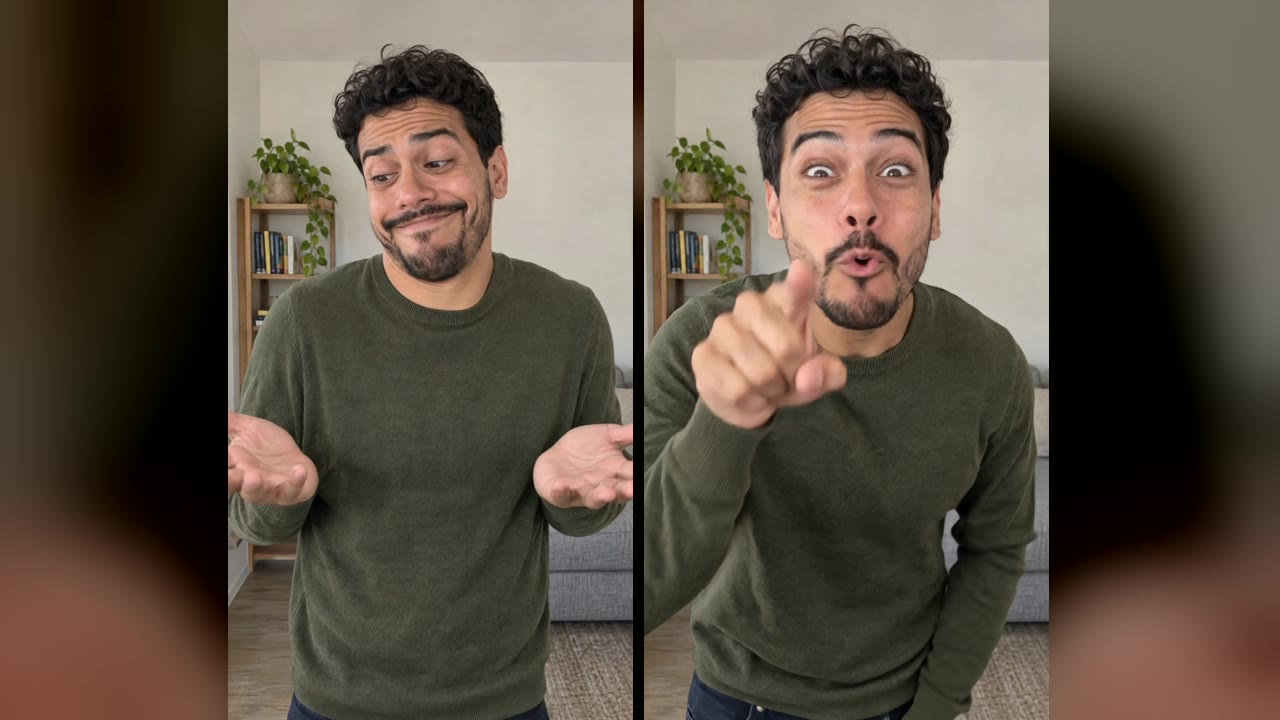
A Bad Times-style AI video shows one person arguing with the camera as if it had just said something unbelievable. On IntoTheMeme, that idea is a template called Camera Argument: you upload one photo of an adult, check a still preview, then turn it into a 10-second, vertical, silent video in a single continuous take.
The room, outfit and gestures are IntoTheMeme's own design. The template does not use the song, footage or people from any Bad Times video, and IntoTheMeme is not affiliated with the song, its artists or any platform. This guide does not cover who started the trend; it explains what our version does and how to get a good result.
What the Camera Argument clip shows
The video is one take from a phone propped at eye level in an ordinary living room. The person wears a plain olive-green sweater and is framed from the waist up, so the hands stay visible. The clip has three beats:
- The shrug. Raised eyebrows, a disbelieving half-smile and both palms open at chest height.
- The "wait, wait". A lean toward the lens, one hand raised and a finger pointed at the camera with two small jabs.
- The calm-down. The hand drops, the head gives a small shake, and the person settles back and looks calmly into the camera.
The comedy comes from the exaggerated reaction, not from anything aggressive. Nobody touches or hits their face, and there is no threat in the gesture. The clip is not timed to any song and there is no lip sync.
What you need before you start
- One photo of one adult. It can be you, or another adult who agreed to it. Do not upload photos of children, celebrities or anyone who has not given permission.
- A clear, front-facing face. Good light, no sunglasses or hat, nothing covering the face.
- Chest-up or waist-up framing helps. The AI builds the room and the sweater, but a photo that shows your shoulders gives it a better sense of your build.
- No mirror selfies. A phone in your hand tends to end up in the result.
This template is for one person only. Pets, couples, lip sync, custom prompts and other video lengths are not available.
Make the video: preview first
- Open the Camera Argument template and choose a credit pack. The pricing page shows the current packs.
- Upload your photo and confirm that you have the right to use it.
- Generate the preview. It is the opening frame of the video: you in the living room with raised eyebrows and open palms.
- If the face looks like you, generate the video. It uses one credit. If a video fails, the credit goes back to your balance automatically.
- Download the MP4 when it is ready.
Previews do not use a credit; your pack includes up to 20 preview images per day. If the preview does not look right, try a clearer photo before you spend a credit on the video.
Check the whole clip before you post
A good preview does not guarantee a good video, so watch the full 10 seconds before you share it. Check that:
- The face stays the same person from the first frame to the last, including as the head turns.
- The eyes, teeth and hands look natural. Count the fingers on the pointing hand.
- The pointing hand stays inside the frame and does not cover the face.
- All three beats are readable: the shrug, the lean-in with the point, and the calm stare at the end.
- The video plays smoothly, without black frames or sudden jumps.
If something looks wrong, generate again from a different, clearer photo rather than posting a clip that does not hold up.
Add a sound you have the right to use
The downloaded video is silent. IntoTheMeme does not supply music and does not license any song. When you post, choose a sound inside your publishing app that you are allowed to use there, for your account and region. The video is not edited to the beat of any particular song, so line up the moments yourself in the app's editor if you want the point or the head shake to land on a beat.
It is also a good idea to turn on your platform's AI-generated content label when you post.
Privacy and consent
Only upload photos you have the right to use, and only of adults who agreed to appear in an AI video. Read the privacy policy before uploading if you want to know how photos are handled. The finished video shows a recognizable person, so treat it like any other photo or video of someone: ask before you post a video of a friend.
FAQ
What scene does the Camera Argument template use?
An ordinary living room with a light wall, a small bookshelf and a gray sofa, filmed like a phone video at eye level. The person wears a plain olive-green sweater. You cannot change the room or the outfit.
Why do the hands matter so much?
The joke depends on the open palms and the pointed finger. That is why the shot is framed from the waist up and why you should check the pointing hand before posting.
Does IntoTheMeme keep my photo private?
Photos are used to make your preview and video. See the privacy policy for details, and only upload photos you have permission to use.
Does the video come with the Bad Times song?
No. Videos are silent. Choose a sound you have the right to use inside your posting app.
Can I make it with my dog or with a friend?
No. This template makes a video of one adult from one photo.
Is it free?
No. Generation requires a purchased credit pack. Each 10-second video uses one credit, and previews are included with your pack.
Ready to try it? Open the Camera Argument template, or browse all meme templates to pick a different scene.